Short answer
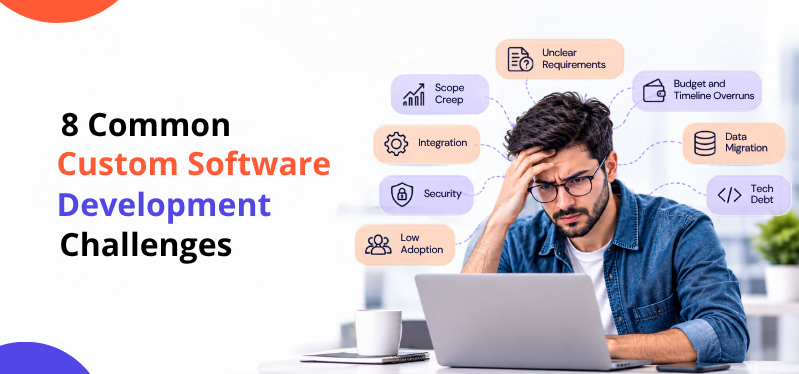
The most common custom software development challenges are unclear requirements, scope creep, budget and timeline overruns, integration problems, data migration, security gaps, tech debt and low adoption. Most of them start before anyone writes code. You avoid them by agreeing scope before the build, shipping in small reviewed steps, and moving users over one workflow at a time.
Below, each challenge covers why it happens, the early warning signs, and what to do about it. If you're still deciding whether to build at all, start with custom software for business.
1. Unclear requirements
Why it happens. The team describes the software it wants instead of the work it needs done. Requirements come from a manager's memory of the process, not from watching the people who run it. Exceptions, which make up much of the real work, get left out.
Warning signs. The brief is a feature list. Nobody can say which result would prove the software worked. Two people describe the same process differently.
How to avoid it:
- Map the workflow with the people who do it, including the exceptions and side spreadsheets.
- Write down users, roles and what each one is allowed to see and do.
- Agree one measurable outcome for the first release, such as hours saved per case or a faster approval time.
- React to a clickable prototype before you sign off on the build. People find gaps faster on a screen than in a document.
2. Scope creep
Why it happens. Every stakeholder sees the project as their chance to fix everything. Small requests pile up, each one reasonable, until the first release is twice its original size. Custom software scope creep is rarely one big change. It's many small ones nobody tracked.
Warning signs. The launch date moves but the scope document doesn't. "While we're at it" shows up in meetings. Nobody can say what's in the first release and what's out.
How to avoid it:
- Sign off a written scope before production code starts, with what's out of scope listed too.
- Keep a separate list for later ideas so people know their request is recorded, not ignored.
- Route every change through one owner who weighs it against time and cost.
- Ship the first complete loop, then add features in later releases.
3. Budget and timeline overruns
Why it happens. Estimates cover the happy path and miss integrations, data migration, testing and review. Costs after launch, such as hosting, support and changes, get left out of the business case entirely.
Warning signs. The quote has one number and no breakdown. Nobody has asked about maintenance. Progress is reported as "70% done" with nothing you can click.
How to avoid it:
- Get scope, timeline and cost in writing before the build starts.
- Budget for running costs, not just the build. Maintenance is a yearly cost, not a one-off.
- Ask to see working software every week. A live preview shows real progress. A status report doesn't.
- Cut scope before you add budget. A smaller first release that ships beats a larger one that doesn't.
Our breakdown of what it costs to create an app with AI covers the hidden costs, from hosting to maintenance, that most budgets miss.
4. Integration
Why it happens. New software rarely stands alone. It has to read from and write to your CRM, ERP, billing, identity provider or accounting system. Each of those has its own data format, limits and quirks, and teams often find them halfway through the build.
Warning signs. "It'll connect to our systems" with no list of which ones. No one has checked whether an API exists or what it allows. Credentials sit in a shared document.
How to avoid it:
- List every system the software must connect to during discovery, not during the build.
- Check each system's API early, and test the hardest integration first.
- Decide which system is the source of truth for each type of record.
- Store credentials in a secrets manager, never in code or spreadsheets.
See the systems Dual7 builds against on our integrations page.
5. Data migration
Why it happens. Old data is messier than anyone admits. Records are duplicated, fields mean different things to different teams, and years of workarounds live in notes fields. A migration planned as a one-weekend copy turns into weeks of cleanup.
Warning signs. Nobody has looked at a sample of the real data. The plan is a single cutover date. There's no way to run old and new systems side by side.
How to avoid it:
- Audit the data, logic and integrations in the old system before you migrate.
- Clean and map data in stages, and test each stage with real records.
- Run the old and new systems in parallel until the new one proves itself.
- Move users over feature by feature, not in one big-bang weekend.
That's how one 500-user company moved off Salesforce in 45 days, rebuilding and cutting over without business interruption — see our Salesforce migration case study and guide on replacing Salesforce with a custom CRM.
6. Security
Why it happens. Security gets treated as a final check instead of part of how the software is built. Sensitive data gets logged, roles are loosely defined, and permissions are handled only in the UI.
Warning signs. No one can say who can see which records. There's no audit trail of who changed what. Credentials or API keys sit in environment variables on developers' laptops.
How to avoid it:
- Define roles and permissions during requirements, and enforce them at the data layer.
- Keep customers' or business units' data isolated from one another from the first database migration.
- Turn on audit logs from day one.
- Review every change for access control, input validation and data exposure before it ships.
Our AI code security checklist lists what to check before AI-built code goes live. For multi-customer apps, see multi-tenant, RBAC and audit trails by default. Dual7's own controls are on our security page.
7. Tech debt
Why it happens. Shortcuts taken to hit a deadline never get cleaned up. Code built on a proprietary platform can only be changed by that vendor. Without documentation or tests, each new feature takes longer than the last.
Warning signs. Small changes take weeks. Only one developer understands part of the system. You can't get a copy of your own code, or it won't run outside the vendor's platform.
How to avoid it:
- Make sure you get the full source code in a repository you control.
- Prefer standard technology your own team or any other developer can maintain.
- Keep each change traceable to the requirement that asked for it.
- Budget time in every release to fix shortcuts, not just add features.
Read what owning your code should actually include before you sign with any builder.
8. Low adoption
Why it happens. The software works, but people keep using their old spreadsheets. The users who do the work weren't involved in the design, so it doesn't match how they work. Training is a single session at launch.
Warning signs. Users haven't seen the software before launch day. Nobody has measured how the work is done today. The old tool stays available with no plan to retire it.
How to avoid it:
- Involve the people who do the work from the first workflow map onward.
- Let them click through each weekly increment and give feedback.
- Train each team on the workflows they use, when those workflows go live.
- Measure the outcome you agreed at the start, and retire the old tool once the new one is used.
How Dual7 de-risks a build
Dual7 builds custom software in four steps, and each one targets the challenges above.
- Discover. We map the workflow with the people who run it, write down users, roles and access needs, and list the systems the app must connect to. This covers unclear requirements, integration and low adoption.
- Design and scope. You get a written scope, timeline and cost, agreed before any build starts, plus a clickable prototype to react to. This covers scope creep and budget overruns.
- Build. We build in weekly increments on a live preview you can click through, with dev, staging and production environments from day one, versioned releases and one-click rollback. Production features move through seven stages: Requirements, Plan, UX, Schema, Stories, Build and Publish. Each stage waits for a person to sign it off. Our post on the seven-stage AI SDLC explains each one. This covers security and tech debt.
- Launch and support. We deploy into the cloud accounts you control, train your team, and stay on for support or hand over cleanly to your engineers. The full codebase is yours. This covers tech debt and low adoption.
Want to see how we'd build yours? Book a demo.
Frequently asked questions
Frequently asked questions
Why do custom software projects fail?
Most fail for reasons set before the build starts: unclear requirements, a scope that keeps growing, and a budget that leaves out integration, migration and running costs. Projects also fail after launch when the people who do the work don't adopt the software. Agreeing scope up front and shipping in small, reviewed steps prevents most of these.
What are the biggest risks in custom software development?
The biggest risks are building the wrong thing, overrunning budget and timeline, losing or corrupting data during migration, shipping security gaps, and ending up with code you can't maintain or don't own. Each one has a clear guard: discovery, written scope, a phased migration, security review on every change, and full code ownership.
How do you prevent scope creep in a software project?
Sign off a written scope before the build starts, including what's out of scope. Send every change request through one owner who weighs it against time and cost. Keep a list of later ideas, so good requests wait for the next release instead of stretching this one.
How long should a custom software project take?
It depends on the workflow, the integrations, how much data you're moving and the review process. Plan around the smallest complete workflow you can release, then add to it. A focused internal tool is a very different project from replacing a system of record used by hundreds of people.
Want something like this built for your business?
Book a DemoArticle Authors

More posts from this author
Related posts