Phosphor Grid — Landing Page Template
Phosphor Grid is a dark terminal ai landing page template built for developer-tool teams that would rather show a working CLI than a glossy hero illustration. The layout runs green-on-black in JetBrains Mono, opens every section with a 1px rule and a source-comment label like `// 02 — features`, and puts a live terminalWindow where most templates drop a 3D render. It is dark-only on purpose: the audience lives in editors and terminals, and the phosphor-green accent only reads as alive against near-black.
Made for AI and infrastructure startups shipping a CLI, SDK, or agent framework that need a marketing site engineers actually trust. It fits founders and technical writers who want the page to look like it was authored by the same people who wrote the tool. Reach for it when a rounded, pastel SaaS layout would undersell how technical the product is.
| Included pages | Home, Features, Pricing, Changelog |
|---|---|
| Best for | Made for AI and infrastructure startups shipping a CLI, SDK, or agent framework that need a marketing site engineers actually trust. It fits founders and technical writers who want the page to look like it was authored by the same people who wrote the tool. Reach for it when a rounded, pastel SaaS layout would undersell how technical the product is. |
| Type | Website |
| Category | Landing & Marketing |
| Themes | 1 |
What's included
Home
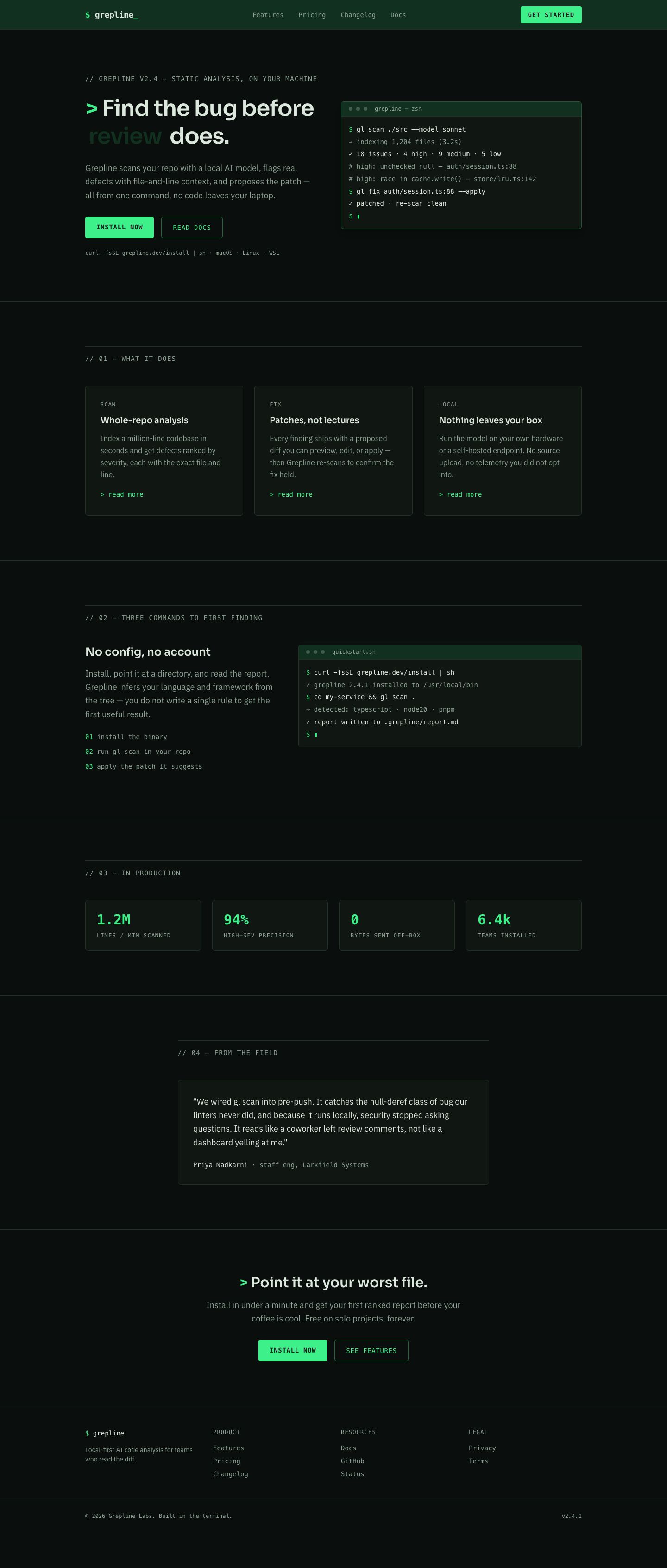
Terminal hero, three-up feature preview, a scripted install walkthrough, usage stats, an engineer testimonial, and a closing install band.
Features
Six ruled capability sections — scanning, autofix, review, agents, self-hosting, and audit — each with a command line and plain-language explanation.
Pricing
Three pricing tiers, a detailed feature comparison table, and a short buyer FAQ, all in the near-square terminal card style.
Changelog
A reverse-chronological release log with version tags, dates, and grouped added/fixed/changed entries in mono type.
Key features
- The home hero pairs a display headline with a live terminalWindow that streams the tool's own `gl scan` output, cursor blinking on the final line — the whole point of this terminal landing page design is that the demo is the image.
- A three-up feature grid uses monospace kicker labels such as `// 02 — features` so each card reads like a commented block in source rather than a marketing tile.
- The /pricing page ships three tiers — Solo, Team, and Enterprise — plus a full comparison table with eight-plus feature rows and an amber `POPULAR` badge on the middle card.
- A dedicated /features page walks through six capabilities, each in its own ruled section with a copyable command line beside the prose.
- The /changelog page lists dated releases from 2026-07-18 back to 2026-03-02 in a mono timeline, so this devtool landing page template doubles as a public release feed.
- Every major section opens with a full-width 1px border rule and an uppercase mono label, giving the ai landing page the cadence of a well-commented config file.
- Forms use dark-fill inputs with phosphor-green focus rings and inline `! ` error lines below the field, matching how the CLI itself reports failures.
- Buttons are uppercase mono verbs like `INSTALL NOW` and `READ DOCS` on a solid phosphor-green fill with a 2px radius, never a pill or a gradient.
Design system
Built on the Phosphor Grid design system — a dark-mode system.
Compare landing & marketing templates
| Template | Type | Pages | Themes | Industries |
|---|---|---|---|---|
| Basel Atelier A Swiss-grid architecture marketing site with a typographic hero, ruled project index, and studio page. | Website | 4 | 3 | Creative & Media, Real Estate |
| Loam Commons An earth-toned community garden site with a story hero, program cards, harvest stats, and membership tiers. | Website | 4 | 3 | Nonprofit |
| Masthead Studio A broadsheet-editorial agency site with a serif hero, case-study work index, and services register. | Website | 4 | 3 | Creative & Media, Professional Services |
Screenshots
Every page in the Phosphor Grid template, plus the mobile layout.


Phosphor Grid FAQ
Who is this template for?
The dark terminal ai landing page template is for developer-tool companies — CLI, SDK, and agent-framework makers — whose buyers are engineers that read before they click. If your product lives in a terminal, this page will feel native to it.
Is it fully responsive?
Yes. The 12-column grid caps content at 1120px and prose narrows to a 720px measure; feature grids collapse from three columns to one below 768px, and the nav switches to a compact bar on small screens.
Do I have to keep it dark?
The system is dark-only by design, but every color is a design token, so you can retune the phosphor-green accent or lean on amber instead. Treat it as a dark landing page template first, then adjust the tokens rather than the markup.
Is the terminal hero a real terminal?
It is a styled terminalWindow component — a title bar with three status dots, mono command lines prefixed with `$`, muted output, and a blinking `▮` cursor. Drop in your own commands and output; no runtime or WebSocket is required.
What pages are included?
Four: Home, Features, Pricing, and Changelog. The header nav is identical across all four, and flow states like form errors are handled inline rather than on separate pages.
Which browsers does it support?
It targets current evergreen browsers — Chrome, Firefox, Safari, and Edge — and relies only on standard CSS grid and flexbox, so no polyfills are needed for the layout or the blinking-cursor animation.
Related templates
A Swiss-grid architecture marketing site with a typographic hero, ruled project index, and studio page.
An earth-toned community garden site with a story hero, program cards, harvest stats, and membership tiers.
A broadsheet-editorial agency site with a serif hero, case-study work index, and services register.
A dark glassmorphic security site with a threat hero, platform modules, solutions, and enterprise pricing.
A cinematic dark one-page launch site with a reveal hero, feature beats, spec ledger, and one glowing CTA.
A candy-bright eLearning marketing site with program cards, a parents page, and family pricing plans.